Flagship product
bimi — your native agent.
Conversational AI, with memory. Memory-rich. Privacy-respecting. Built natively for macOS today; the iPhone, iPad, Watch, Vision Pro, and TV spokes are shipping in waves — see the roadmap for the next wave. One memory, one identity, every screen — once each spoke lands.
What bimi is
bimi is a native macOS application — SwiftUI, MetricKit, CryptoKit, no web wrapper — that you talk to, write to, and live with. Voice is push-to-talk today (speaker recognition is on the roadmap), it holds an editable memory of what matters, it adapts to your work — drop a switch config and it remembers your machines — and it uses your Mac's Apple Silicon chip to run as much of the model work locally as possible. The cloud is opt-in and named.
Three things bimi is not: a chatbot in a tab, a hosted assistant, a workflow builder. It's an agent that earns its place on the dock.
"Memory you can see. Voice that knows who's talking. Proactive, not pushy."
What it can do
Memory, voice, and routing are the spine. On top of them, bimi is a working assistant — it takes action, speaks your formats, and bends to how you work. Everything below ships in the current beta.
- Bring your own models. Any OpenAI-compatible endpoint — OpenAI, OpenRouter, Together, Groq, a local Ollama, your own server — plus Anthropic's Claude and Apple's on-device model. Mix and match; bimi routes between them per request.
- It takes action. bimi runs real tools on your behalf mid-answer rather than describing them — and asks first, through a deterministic gate, before anything that changes or deletes.
- Reads your infrastructure. Drop a Cisco IOS or FortiOS config and bimi extracts the device, interfaces, VLANs, and policies into memory, then answers against them; it runs diagnostics over SSH and reuses the login and key it learned on first connect. More vendors on the roadmap.
- Answers in the shape that fits. Tables, diagrams, and cards inline when they help — not a wall of prose. Drop in a file, photo, or spreadsheet and bimi works with it.
- Interrupt any time. Talk or type over bimi mid-turn; nothing in flight is lost.
- Deeply configurable. Structured settings for every part — persona, memory, voice, privacy, per-conversation overrides — and bimi can adjust them for you on request.
Memory Constellation
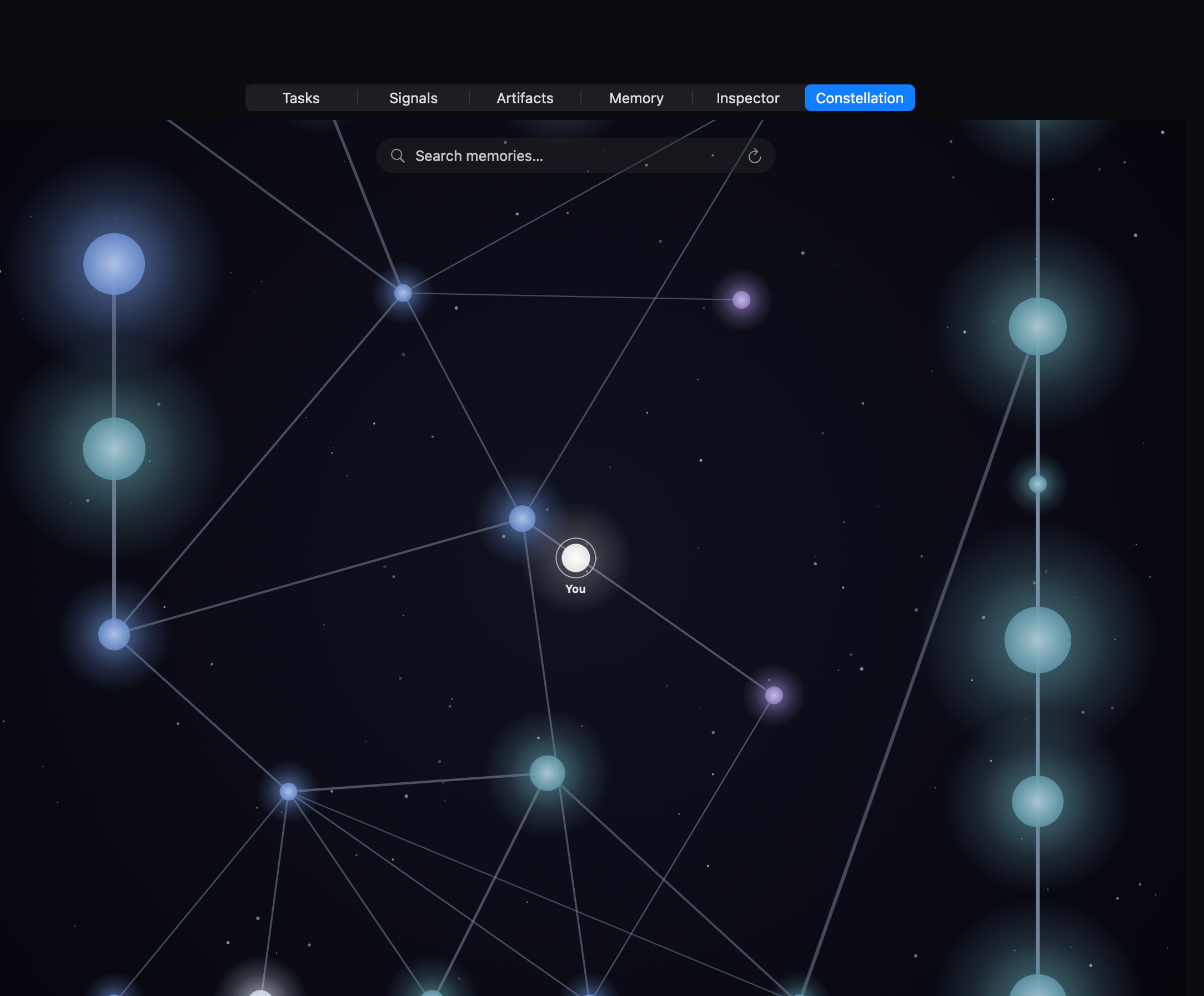
Every fact bimi remembers shows up as a star in a category-coloured sky. Identity facts (who you are, where you work), preferences (what you like, what you avoid), commitments (what you said you'd do), and episodes (what happened, with whom, when) each get their own region. Lines between stars are graph edges — the same edges retrieval walks.
Tap a star to read it. Edit it to correct it. "Forget" it to drop it permanently (with a tombstone so it can't silently come back). The constellation is not a metaphor — it's the same data your memory queries run against.
For the architecture, head to how memory works. The diagram of the signals → memory → reflection loop lives there.
Voice that knows who's talking
Push-to-talk works today on Mac. A "Hey bimi" wake-word mode is built but switched off in the current beta — Apple is building always-listening assistance into macOS itself, and we'd rather not ship a second one. Diarization and speaker ID are landing in a future wave. Speaker recognition — knowing it's you, not your spouse, not your kid — will use voiceprints stored locally as sensitive memories. Raw audio is never persisted or transmitted.
- "Hey bimi" wake-word — built on the system Speech framework, currently switched off in the beta while the platform's own voice features settle. Push-to-talk is the path today. paused
- Diarization — who said what in a multi-speaker room. coming
- Speaker ID — opt-in voiceprints, encrypted with your device key. coming
- Voice character with warmth — not a monotone TTS. A patient, human presence is the target. coming
- Push-to-talk + on-device ASR — works today. live
The audio guarantee
For push-to-talk, the wav lives in RAM, becomes text + signal, and gets dropped. Meeting Mode keeps an m4a in a sandboxed cache so bimi can transcribe a multi-hour session — the retention default is 7 days (a user-facing Settings toggle is landing in a near-term wave; today the default is the value). No audio is ever transmitted off-device or routed to a cloud transcription service. The voiceprint, once shipped, will be the only audio-derived artifact persisted by default — encrypted, your-key-only.
Hub-and-spoke across your devices spokes coming in waves
macOS ships today and is the hub: it has the chip, the storage, and the open SwiftUI runtime to host the full agent. The spokes — iPhone, iPad, Watch, TV, Vision Pro — are on the roadmap, landing one at a time. Each spoke shares the constellation and the identity; heavy lifting stays at the hub.
The diagram below is the target topology. Today, only the macOS node is shipping.
Smart hybrid routing
bimi decides, per request, where to run the work — and it doesn't guess. bimi's profiler measures what each connected model can actually do (reasoning, honesty, grounding, tool-use), and the router sends every call to the cheapest model that clears the bar for that task. Default is local: a llama.cpp-served open model, sized to your Mac, handles memory classification and extraction; local embeddings handle retrieval. Conversations run on the brain you pick — fully local, or your own frontier key — and a task marked on-device can never leave your Mac. The table below is the local-first bias; the pick within each lane is measured, per call.
| Workload | Default lane | Spills to |
|---|---|---|
| Memory classification | Local brain (llama.cpp, on-device) | a larger local tier, or your cloud provider if you allow it |
| Memory extraction (background) | Local brain (llama.cpp, on-device) | a larger local tier, or your cloud provider (while tight, after you consent once) |
| Short-form chat / replies | the brain you pick (local or your key) | — |
| Long-form reasoning | Anthropic / OpenAI (named) | — |
| Embedding small corpus | system NaturalLanguage, local | — |
| Embedding large corpus | Cloud, named | — |
| Tool calls (calendar, mail) | Local, sandboxed | — |
Every routing decision is visible in the bimi console — provider, model, and reason. No silent escalations. How routing works, in depth →
Memory: on-device by default, by type — not by promise
By default, the memory subsystem (classification, extraction, curation) is restricted at the type level — only providers that conform to LocalOnlyLanguageModel can be wired into the default path. The on-device lanes conform; cloud providers do not — so the default memory path can't compile against a hosted model, and no refactor or config bug can route it there. Cloud memory processing is a separate, off-by-default choice: allow it full-time, or only while your Mac is under memory pressure (bimi asks once), and memory work routes to the provider you configured, with your keys. Either way, memory is stored only on your Mac, and nothing goes to Appalogue — see Privacy.
Native, end to end
bimi is built with the Mac toolchain. That means: SwiftUI all the way, FoundationModels for on-device LLM work, CryptoKit for the encryption you'll find in the privacy page, MetricKit for crash diagnostics, and a sandboxed App Store core. The power-user surfaces — SSH, shell, things sandboxing won't allow — ship as a separately notarized download we call the Power Helper.
- No Electron. No web wrapper. No JS runtime in the binary.
- No telemetry SDK. No Mixpanel, no Amplitude, no Sentry, no Crashlytics. Details on /privacy.
- App Store + sidecar split. Sandboxed core via the Mac App Store; sandbox-incompatible capabilities as the Power Helper download.
- Self-updating Power Helper. Install it once — it verifies and installs its own signed updates in the background, so it never drifts from the app and you never re-download it manually.
- Apple Silicon native. Built for the on-device Foundation Models stack — M1 or later.
System requirements
Today's beta is macOS-only. iPhone, iPad, Watch, Vision Pro, and TV spokes are shipping in waves over the next two release cycles.
- Hardware — Apple Silicon Mac (M1 or later). Intel Macs are not supported.
- macOS — 26 Tahoe or later.
- On-device brain — a local llama.cpp model, sized to your Mac (see RAM below). Apple Intelligence is optional: when your Mac has it, bimi can also use Apple’s on-device model as a zero-setup brain — but it is never required.
- Disk — ~250 MB for the app, plus a one-time on-device model download sized to your Mac (~2.5–5 GB), plus memory storage that scales with your use (typically < 100 MB).
- RAM — 16 GB minimum, and we don't recommend bimi below it. The on-device memory brain is sized to your Mac so it runs with real headroom, never in swap: 16 GB runs the compact brain (the larger model that would thrash 16 GB is never offered here), 24 GB is a comfortable choice and steps up to the larger brain, and 32 GB or more is ideal — the most headroom for the biggest local models and heavy concurrent work.
- Network — only required for explicit cloud routing or update checks. bimi runs offline otherwise.
How to get it
The beta is invite-only — we want a small group while the rough edges smooth. Apply via the form on the home page. Approved testers get a one-time setup link by email (never a password) and land on the download page.
Once you're in, the download page hands you a signed Apple Silicon
.pkg. Install steps walk you through the macOS Gatekeeper
warning the first time you open it.
Already invited?
Head to reports.appalogue.com/beta/ to sign in and download.